
'/%3E%3Cpath%20fill='%2330c2dc'%20d='M493%20379c-14-6%2010-16%2014-16-8-1-21%203-27%203l-57-3c-7-1-12-10-10-10-3%203-37-9-27%200l9%2014c15-3%2030%208%2013%2014%203%200%2057-4%2085-2'/%3E%3Cpath%20fill='%23f9aa51'%20d='M475%20366v13q-1%207-7%207h-35q-6-1-7-7v-13q0-6%207-7h35q7%201%207%207'/%3E%3Cpath%20fill='%230c8489'%20d='M388%20335c-11%205-28-12-25-24%203-13%2028-2%2029%2014%207-2%2020%202%2025%207%209-11%2038-3%2041%2010%2011-13%2028-9%2034-3%2013-10%2033-4%2030%207-3%2012-29%2015-37%206-1%201-20%200-22%2016h-11c-3-4-2-14-1-15-11%204-29-3-34-10-7%204-25-1-29-8'/%3E%3Cpath%20fill='%23fcca3d'%20d='m419%20304-3%203c-7-4-11%208-19-2-2-3-3-10%205-16%205-3%2018-5%2019%200%203%206%207%206%204%209l4%203v9zm56%2031c-15%204-16%209-15%2012q-7-6-1-10c-9-8-10%206-8-6%201-8%2024%205%2018-15h9q-1%2015%2017%2019c0%2024%202-3-6%205-2%200-5-6-14-5'/%3E%3Cpath%20fill='%238f4620'%20d='M418%20268c-4-24%2020-46%202-44-16%201-18-2-18-2-6-7%2010-11%209-20q2%2011%205-4c2%206%204%208%205-3%205%207%2017%205%2025%2010q-3-6-10-11c-12-11%2012-9%2012-9%2033-11%2044%2012%2061%2012-17%203%2013-2%2038%2058-18-11%2012-1-7%2067%200%200-45-57-36-39-10-5-20-18-20-18-11%203-2%204-1%2020%200%200%2043%2030%2045%2036%201%206-10%204-25%207-16%202-23-20-22-10s-16%205-16%205-19-29-19-9c-39-3-20-15-20-15s10%202%208-2c-2-3-12-4-16-29m-7-66'/%3E%3Cpath%20fill='%23f9c83a'%20d='M407%20220c10%203%2015-3%2016%204%204%204-22%209-19%2014-7%203-18-10-5-16%201-5%206-3%206-3l6-8q3%207-4%209'/%3E%3Cpath%20fill='%23a8ac71'%20d='M403%20309c-15%201-19%205-23-16-18-16-8-25-7-28%201-8-12-11-15-10-1-8%2022-1%2021%209-1%209-7%2011%206%2024%205%204%203%2014%2011%2011-1%204%203%2010%207%2010m6-18c10-8-24%202-26-24-1-15%2027-22%2023-34l-5-3q1-4%207-3c19%2015-11%2027-14%2038-4%2024%2031-5%2025%2029l-3%205q-7-4-7-8m-11-54c-25%206-23-35-7-35%201%2020-15%2015%205%2015-8%200-13%2011-3%2012q1%206%205%208'/%3E%3C/svg%3E)
Omnichannel Contact Center
Provide customers with seamless, effortless conversations across all channels and allow them to switch channels.

Enables real-time collaboration, improving the productivity of agents and supervisors.
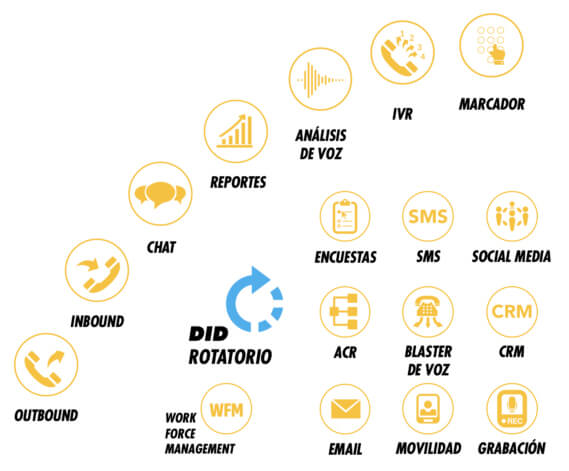
All the tools your company needs to:
- Analyze and optimize the operation.
- Make your C/CC more productive.
- Improve your ROI.
- Generate relevant omnichannel experiences with your customers and collaborators.

Omnichannel Contact Center

Inbound & SMS

Routing

Outbound calls

Omnichannel

AI, bots, and cognitive technologies

Email Management

Webchat

Messaging Apps

Contact and Case Management

Reports and Analytics
The following charts show where our Call and Contact Center solution fits into your company.

Back Office
Your back-end IT systems, such as an ERP or systems for managing your company’s resources.

CRM
Your systems for managing relationships with prospects, clients, projects, and more…

Contact Center
Voice, video, and/or data communication systems: IP PBX, IVR, email, chat, videoconferencing, and much more… with TOGA Customer Services.
True omnichannel routing
Todos los canales están unificados en lugar de aislados. Esto significa que el enrutamiento se puede realizar sin esfuerzo y permite a las empresas ofrecer una experiencia de cliente “todo en uno” rica y personal. El enrutamiento se puede hacer en función de las opciones de autoservicio basadas en inteligencia artificial, los datos del cliente y el historial de interacción, o el nivel de habilidad y experiencia del agente.
Quality of 100% of interactions across all channels
Ensure high customer satisfaction across 100% of interactions on all channels. Built on a single, unified architecture and integrating best-in-class AI for automation, the solution enables call center managers and supervisors to monitor agent activity and consistently ensure excellent customer interactions. Implement workforce optimization and ensure seamless contact center operations through an omnichannel approach.


TOGA Business Cloud Contact Center
Integrate your workforce into a single interface.
One place, multiple interactions, multiple skills.

Predictive Dialer

Inbound Calls
Outbound calls


Chat

SMS
TOGA Call and Contact Center: Key Features
Incoming Voice Calls and SMS
Call control from the browser
Regardless of the agent call delivery option used—whether a built-in softphone, SIP phone, WebRTC, DID, or open-line dialing—calls are fully controlled from the Agent Desktop web application.
Call transcription
Call transcripts in a customer’s activity history help agents quickly understand the meaning of phone calls within their context. Additionally, transcripts help managers easily search for interactions across voice conversations, messages, and email, as well as leverage cognitive technologies.
Conversation continuity for missed calls
When a customer calls back minutes after ending a call, the call is routed to the same agent who assisted them, bypassing the IVR and queues and resuming the interrupted conversation.
Sending SMS during calls and separately
At any point during a call, a customer or an agent can send SMS messages to each other.
Virtual queue with callback
During peak call volumes, callers have the option to hang up and receive a callback when an agent becomes available, in the same order the original call was received.
Playback of pre-recorded messages
Agents can record frequently used messages in their own voices and play them back during calls to improve efficiency and consistency.
Routing
Automatic Call Distributor (ACD)
Calls and other interactions are automatically distributed to the correct agents based on a combination of interaction and agent properties.
Enrutamiento basado en habilidades
Skills-based routing allows administrators to distribute interactions to agents accurately and fairly, targeting the available agents best suited to handle the interaction in question.
Omnichannel capability and prioritization
A unique model used as a routing engine that enables agents to handle various interactions based on priority categories (e.g., calls over emails).
Priority route
Contacts who have been identified as high priority may enjoy shorter wait times, or even no wait at all, when using our priority routing feature.
Same-region routing
Same-region routing helps keep calls closer to agent teams, with global overflow occurring when no one is nearby or wait times are excessive.
Personal routing
Interactions with an identified contact (that is, a contact identified using data from a CRM) can be routed to the same agent and/or an agent on the same team that previously assisted that contact.
Outbound
Any dialing method
Predictive, preview, progressive, and manual preview modes allow campaign operators to customize the dialer for any list quality and/or desired level of agent engagement.
Extensive sorting and filtering list
Refine lists by sorting and filtering to maximize output, manage multiple call center operations, move records between campaigns, and prioritize leads.
Optimal calling times
Maximize response probability and compliance with safe calling hours linked to recorded area and zip codes.
Accurate call progress analysis and answering machine detection
It automatically detects when an answering machine or a live person has answered a call and determines when to leave messages versus when to connect live callers to agents—all while maintaining a high predictive connection rate.
Contacting the right party
With permission-based predictive dialing, agents communicate with the right person every time, increasing agent utilization and decreasing call abandonment.
Dynamic Caller ID assignment
It increases the likelihood of a call being answered by dialing from phone numbers close to the target. The caller ID is automatically specified or defined via a registration list.
Predictive dialer
Our cloud-based predictive dialer automatically dials a list of numbers and connects only answered live calls to agents, saving time and improving call efficiency.
Automatic Call Distributor (ACD)
Automate omnichannel routing with our advanced Automatic Call Distributor (ACD), which delivers interactions to the most qualified agents, not just the first available one.
Omnichannel Scenarios, IVR, and Workflow
Interactive Voice Response (IVR)
IVR scenarios are easily defined using our visual drag-and-drop editor.
Multiple integrations for data access
Various data access integrations are available as easy-to-use scenario blocks, with point-and-click configuration.
RESTful API and direct database access
Access to the web service through scenario blocks and blocks for direct database access offer flexibility beyond the integrations offered out of the box.
SMS and email capabilities
Scenarios can send emails and SMS messages for notifications, transcripts, and survey requests, as well as provide confirmation numbers and other written information.
Workflow automation
Once all interactions are finished, many triggers, including call dispositions, can initiate a workflow scenario that automates processes using scenario-based communication and integration/data access blocks.
Omnichannel Scenarios
Voice calls, chats, and workflows are controlled by the same scenario mechanism, featuring shared communication and data access integration/blocks.
AI, Bots, and Cognitive Technologies
Automated conversations with bots
There are several bot integrations available, from simple to complex. Bots can connect agents at any time to keep customer satisfaction high.
Automation with a human touch
Bots can connect an agent, and an agent can add a bot to a chat conversation to handle simple tasks and frequent requests at any time.
Intelligent assistance for agents
AI systems can be used to track conversations and provide possible responses to agents.
Acoustic alteration analysis, tracking, and routing
Cross-channel sentiment analysis enables agents and supervisors to quickly focus on problematic conversations.
Quality management automation
Our automated features help quality management coaches select conversations that require attention.
Information on changes in customer behavior
See what customers are talking about and track changes in topics over time.
Email management
Push and pull distribution mode
There are several bot integrations available, from simple to complex. Bots can connect agents at any time to keep customer satisfaction high.
Service Level Management
The time remaining before a service level commitment is breached is used to prioritize messages in the queue.
Keyword and sentiment routing
Keywords and sentiment values extracted through natural language understanding could be used to route and prioritize messages.
Automatic case creation and tracking
Each message is stored in a box—a virtual folder created and updated automatically—containing the history of all communications with all related parties, regardless of the channel.
Tracking queue
Agents can mark answered cases for follow-up and return to them at a later date to encourage unresponsive parties or update clients on new developments.
Integrated knowledge base
An integrated knowledge base helps maintain training levels and response consistency. The knowledge base supports full-text search, usage frequency tracking, and content import and export.
Web Chat
Simple widget configuration
All aspects of chat widgets, chat forms, and proactive chat can be edited and customized in our intuitive editor user interface without having to code or reload HTML chat snippets.
Proactive Chat
Using point-and-click settings, different offers can be displayed based on a web page, several other conditions, or in combination.
Response timer
A handy visual timer shows agents which customer they are chatting with and how long they have been waiting for a response.
Web notifications
Web notifications remind customers about their chat sessions, which helps reduce customer-abandoned chats.
Co-browsing
Customers can share their screens with agents during a chat on a company’s website, allowing the agents to follow the customer’s screen movements and clicks.
Voice and video escalation
When enabled, customers and agents can upgrade their chat conversation to a phone call or audio and video call over the Internet at any time.
Messaging apps
Leveraging existing chat apps
Customers can chat with agents using their favorite messaging app, with the ability to send stickers, files, emojis and more.
Receive the client’s location.
Agents can receive a customer’s geographic location directly within a messaging application.
Switch between messaging apps
Switch between messaging apps and SMS text messages on the fly to continue the conversation seamlessly.
Precise identification
Customers with accounts on well-known messaging apps are automatically identified with 100% accuracy.
Bots and Artificial Intelligence
Messaging applications and web chats can be initiated and transferred to a bot. AI-based natural language understanding is used to analyze chat content for sentiment and topic.
Simple channel enablement
Messaging app accounts are easily set up by copying and pasting authorization strings into the call center configuration.
Contact and case management
All channels: a conversation
Agents can communicate with a person regardless of the channel or combination of channels used. Calls, chats, and emails can go back and forth, and the conversation continues.
Conversation continuity
When a call is dropped, a callback will return the customer to the same agent who handled the call. When a customer calls the next day, the customer can start by referring to the email they sent earlier.
Contact activity history
The at-a-glance communication history provides agents with detailed customer information, such as the time of the last interaction, transcripts, and notes from the agents who handled them.
Automatic contact linking with CRM
If a contact exists in a linked CRM, the local contact is automatically created and linked to the source.
Customer communication history at a glance
A customer’s complete communication history is organized into cases, which are either open or closed. Open cases show agents the customer’s latest activity within its context.
Increase in contact details
Supported data enrichment and augmentation providers can help pre-populate new contact data and augment existing contact data with cloud-based information.
Contact and case management
Real-time actionable supervisor dashboard
Supervisors can quickly view metrics for their assigned service queues and campaigns, teams, and agents—along with associated statistics, alerts, and actions—all in real time.
Point-and-click customizable panels
Customizable personal and global dashboards display real-time statistics, metrics, and other data for agents, teams, and supervisors.
Omnichannel reports
Detailed reports include data for all interactions and associated statistics, regardless of the channel.
Drag-and-Drop Report Builder
With point-and-click ease, create custom reports by selecting columns to display in each table, saving and scheduling resulting data sets, and more.
Scheduled ad-hoc reports
Run reports by setting parameters on the fly or schedule recurring deliveries with preset values.
Access to third-party analytics data
Work with data from Tableau, Amazon Quicksight, Zoho Reports, Google Data Studio, Zoomdata, and more.